If you're hunting for the form limiter add-on, there's something you should know first. Google Forms can now cap responses and close on a deadline on its own, for free.
The setting just isn't where anyone looks for it. It's behind the Publish button, not in Settings, which is why thousands of people still go shopping for an add-on every month.
To find the setting, click the sliders icon beside Publish, then Set close date or response limit. You pick either a date or a number of responses, not both. And there's no setting anywhere that opens a form on a schedule.
The native setting, and where Google hides it
Open your form and look at the top right. Next to the Publish button there's a small sliders icon. Click it.
- Click the sliders icon beside Publish to open Published options.
- Click Set close date or response limit. Google still badges it New.
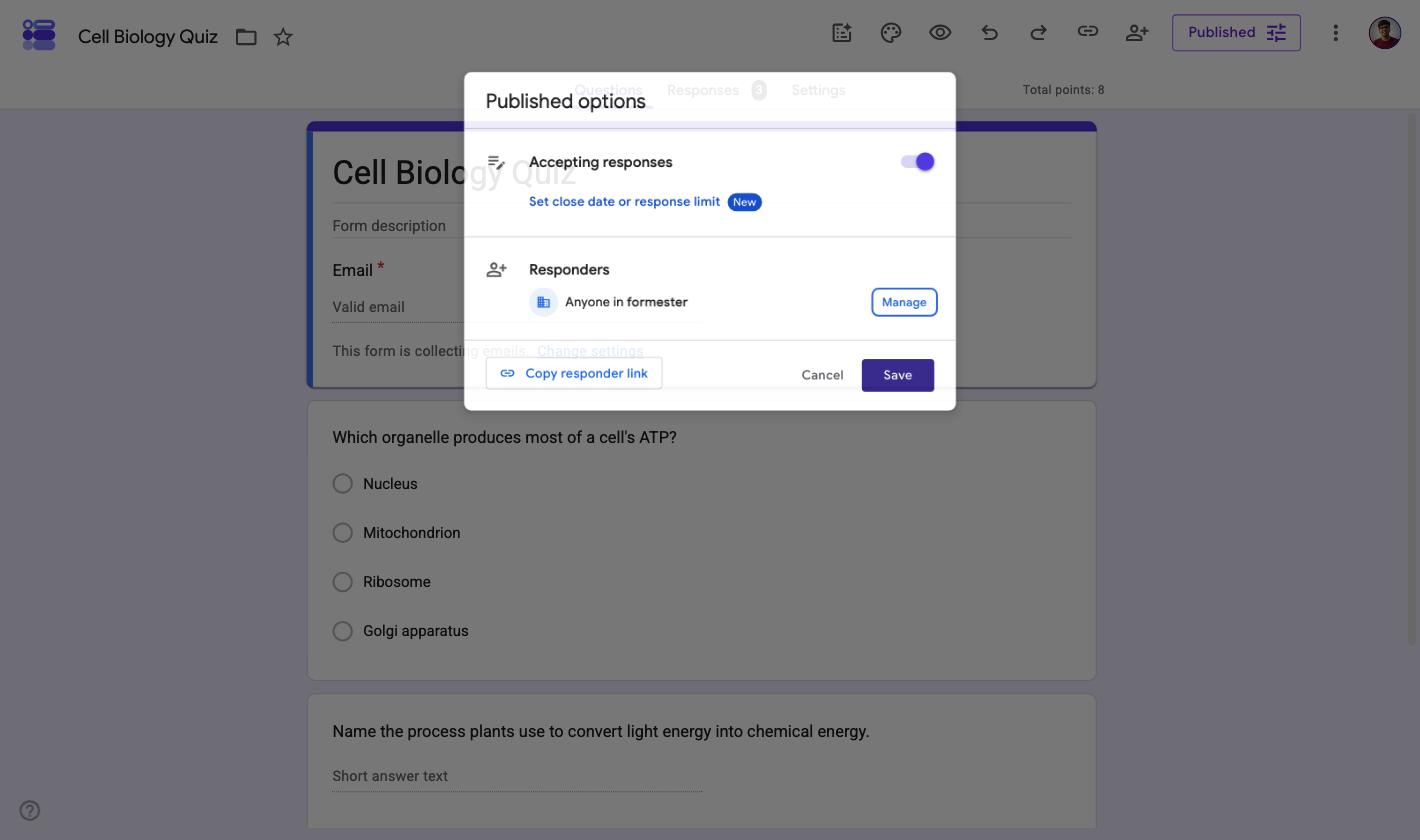
Nothing in Settings points you here. Settings has a "Limit to 1 response" toggle, but that caps each person at one entry, it doesn't cap the form. Two different jobs, and the naming does you no favours.
How to close a form after a number of responses
In the dialog that opens, pick After a number of responses and type your number.
- Choose After a number of responses.
- Enter the cap, then Save.
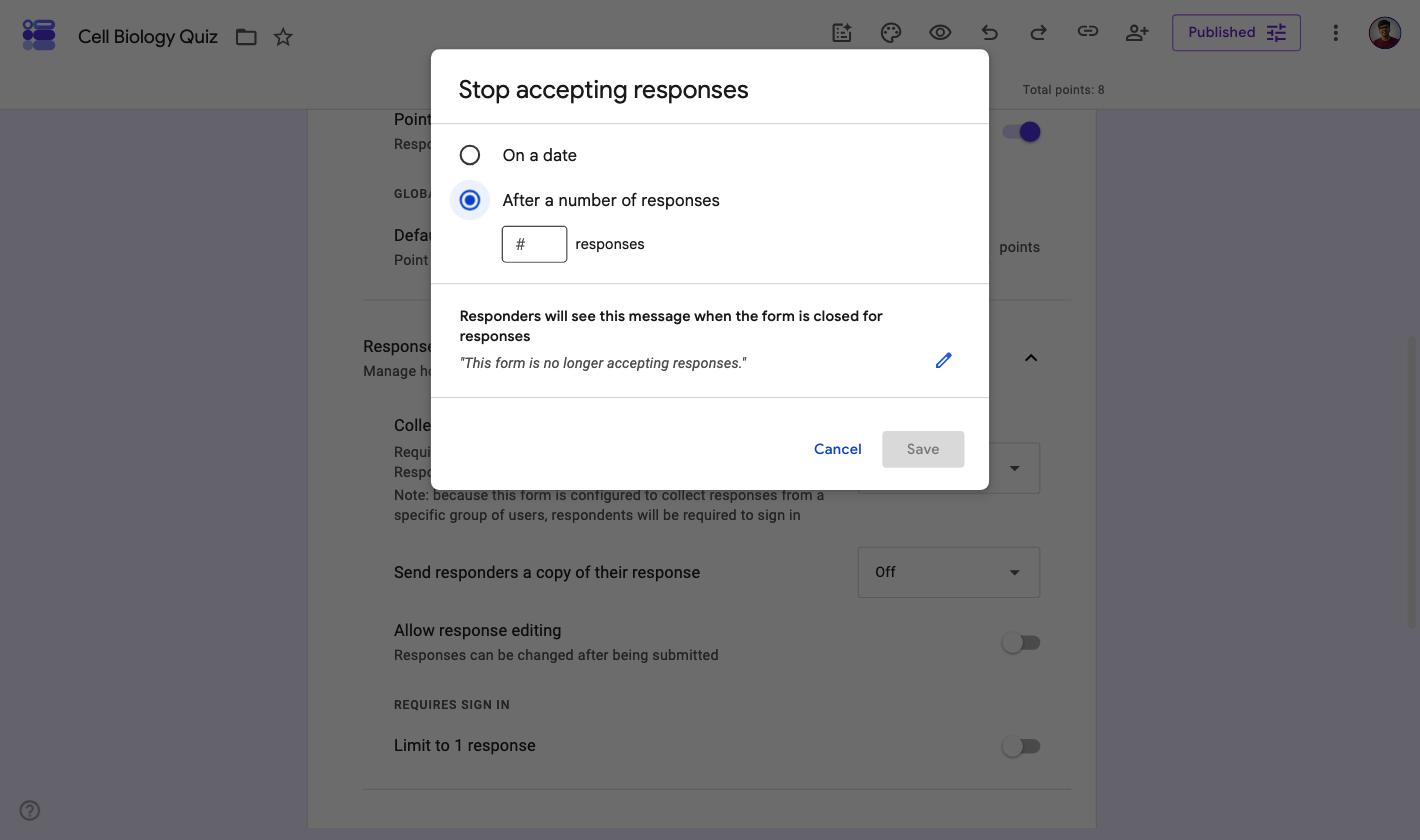
Google counts every submission and shuts the form at your number. Late arrivals get a message instead of a form, so you don't end up with entries you can't honour.
How to close a form on a date instead
Same dialog, pick On a date and set a date and time.
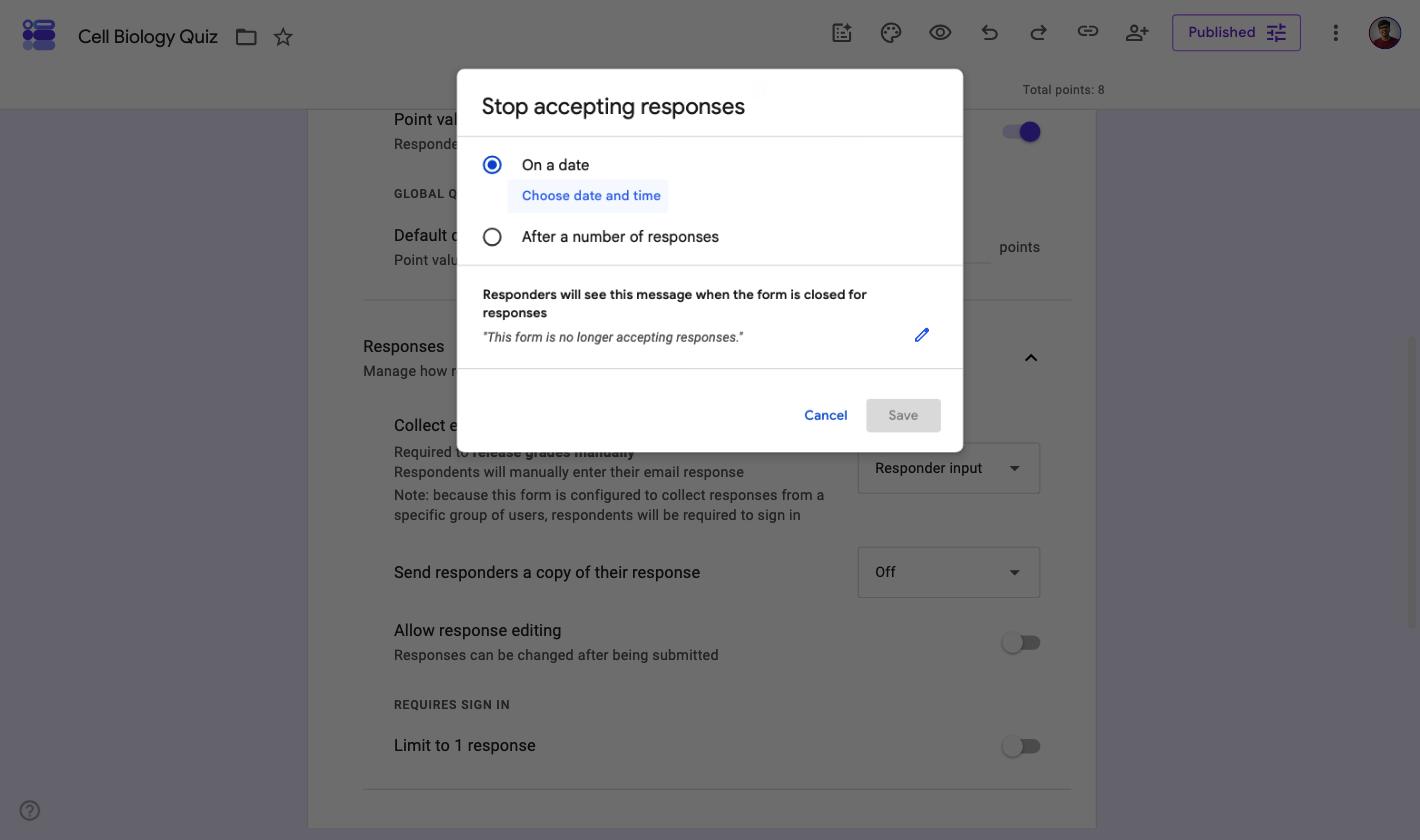
You can also rewrite what people see once it's shut. The default reads "This form is no longer accepting responses", and the pencil icon lets you replace it with something useful, like where to go instead.
The catch: it's a choice, not a combination
Look at those two screenshots again. On a date and After a number of responses are radio buttons. Picking one clears the other.
So you can run "close at 100 seats" or "close on Friday at 6pm", never both. For a limited-seat event with a registration deadline, that's exactly the combination you want and can't have.
There's a second gap. The dialog is titled Stop accepting responses, and stopping is all it does. There's no scheduled open, so a form that shouldn't go live until Monday morning needs you to be awake and clicking on Monday morning.
| What you want | Google Forms, natively |
|---|---|
| Close after N responses | Yes |
| Close on a date and time | Yes |
| Both at the same time | No, the two options are mutually exclusive |
| Open on a date and time | No, you switch it on by hand |
| A different message for "full" and for "deadline passed" | No, one closed message covers both |
| Cost | Free |
So what is the form limiter add-on now?
Here's where it gets confusing, and it's worth five minutes of your attention before you install anything.
The formLimiter people remember was written by Andrew Stillman for New Visions for Public Schools, a non-profit in New York. It was free and open source under the GPL, and it was everywhere in schools. The code is still on GitHub.
Its last commit was in August 2013.
The Form Limiter in the Marketplace today is a different product from a company called Skyfield. That listing is genuinely maintained, updated within the last few days at the time of writing, but it isn't the free school tool people are remembering.
| Plan | Form Limiter | Form Notifications |
|---|---|---|
| Monthly | $9.99 | $10.99 |
| Yearly | $49.00 | $49.00 |
| Lifetime | $149.00 | Not offered |
| Domain licence, per year | $399.00 | $399.00 |
Every add-on starts on a free trial with no card, so you'll only meet the price later. Prices are shown per region on Skyfield's own comparison page, and these are the US figures at the time of writing.
Note the second column. Response limits and email notifications are separate purchases. Wanting a form that caps at 100 and emails you on every entry means two subscriptions, not one.
When the add-on still earns its money
It isn't a rip-off. It does things the native setting doesn't, and if you need one of these, paying is reasonable.
- Recurring schedules. Open every Monday at 9 and close every Friday at 5, week after week, without touching it.
- Per-question limits. Cap individual answer choices, so "Saturday 2pm" disappears once twelve people have taken it. That's Choice Eliminator territory and the native setting does nothing like it.
- Staying inside Google. If your school or company won't approve another tool, an add-on on an existing form is the shorter conversation.
If none of those describe you, the native setting almost certainly covers it, and you can stop reading here with $49 a year still in your pocket.
Need a cap and a deadline on the same form? Formester lets you set an open date, a close date and a response limit together, with a different closed message for each, on the free plan.
When you need a cap and a deadline together
This is the gap that sends people looking for add-ons in the first place, and it's the one thing neither the native setting nor a single Skyfield subscription solves cheaply.
In Formester's form limiter the controls are independent toggles rather than radio buttons, so they stack. Open the form, go to Settings, then Access and scheduling.
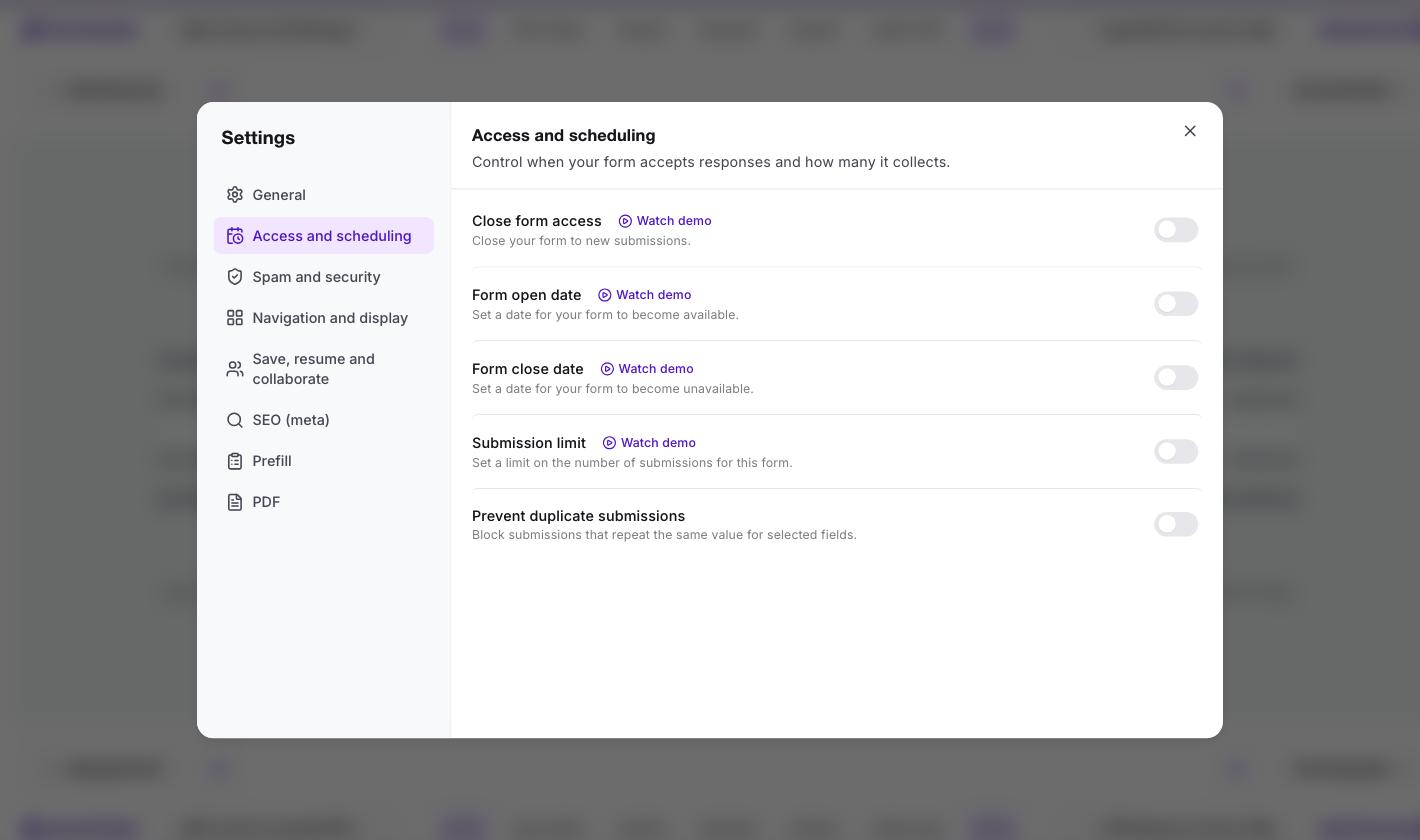
Five controls, and any combination of them is allowed. Switch on both a close date and a submission limit and you get both, each with its own field.
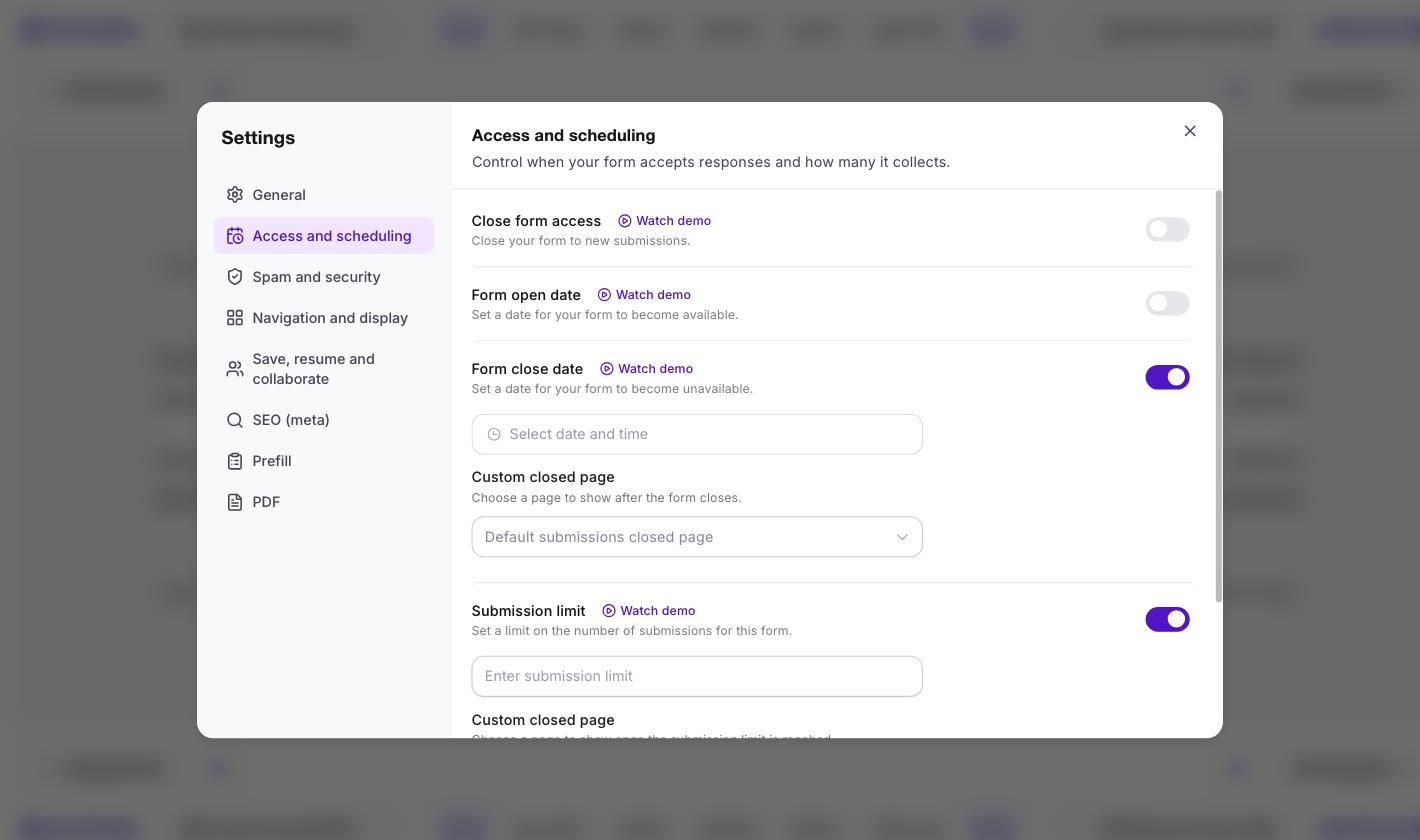
Look at what appears under each one: a separate Custom closed page. So "we're full" and "registration has closed" can be two different messages, which matters when the reason changes what you want people to do next.
Add the open date and all three run together. The form goes live on Monday and shuts on Friday, or earlier if it fills up first.
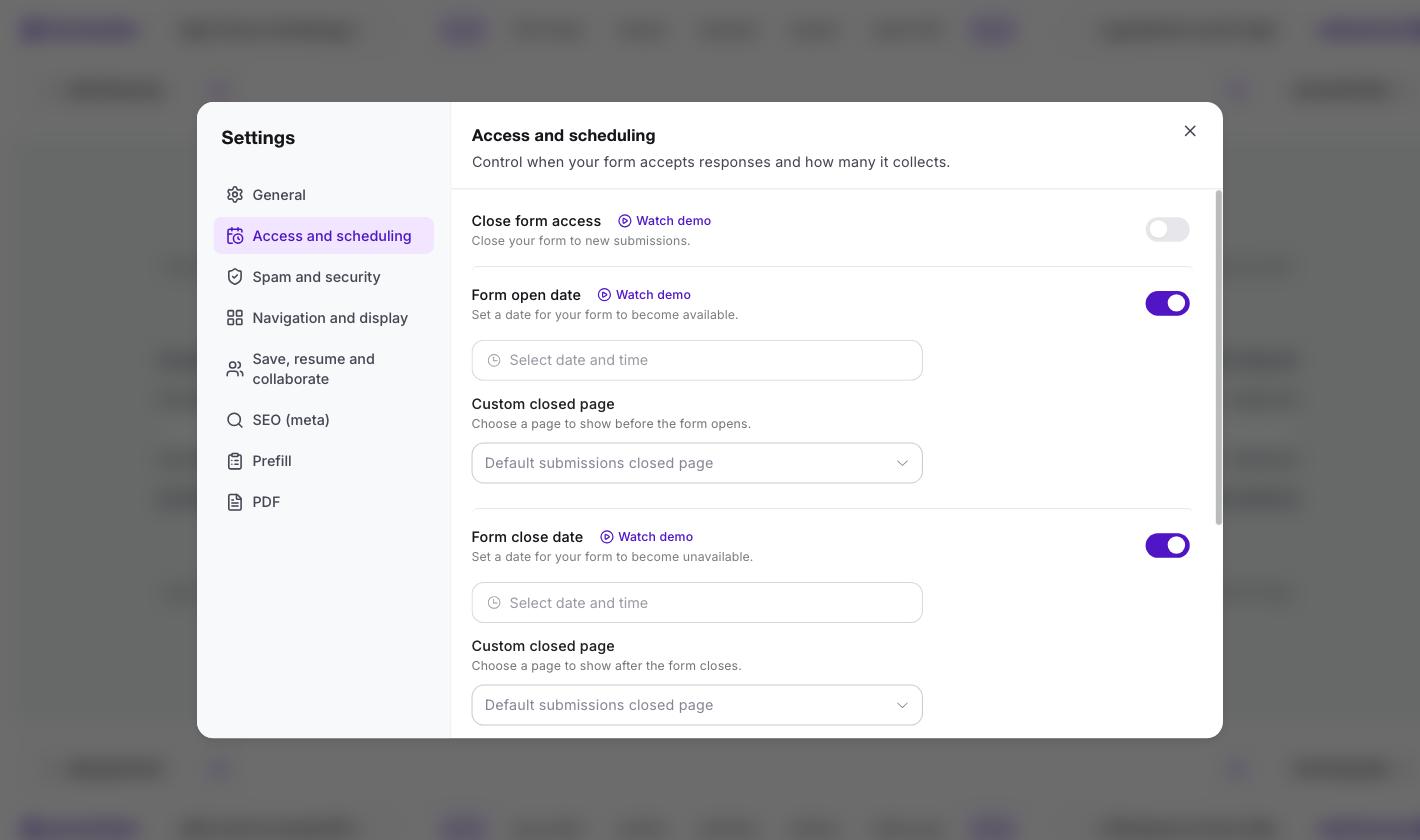
There's also Prevent duplicate submissions, which blocks repeat entries on a field you choose, an email address for instance. Google's equivalent is "Limit to 1 response", which requires everyone to sign in to a Google account first.
| Google Forms | Form Limiter add-on | Formester | |
|---|---|---|---|
| Response cap | Yes | Yes | Yes |
| Close date | Yes | Yes | Yes |
| Cap and date together | No | Yes | Yes |
| Scheduled open | No | Yes | Yes |
| Separate message per reason | No | Varies by add-on | Yes |
| Duplicate blocking without forcing sign-in | No | Varies by add-on | Yes |
| Cost | Free | $9.99 a month after trial | Free plan |
Google Forms is still the right answer for a single constraint. Once you need two at once, you're either paying a monthly fee for an add-on or moving the form somewhere the settings stack by default.
Where teams hit this
The combination problem is almost always about capacity plus time.
- Limited-seat events. Fifty places and a Friday cut-off. Whichever comes first should close it. See our guide to using Google Forms for event registration for the wider setup.
- First-N promotions. The first 200 entries, and nothing after the campaign ends.
- Shift and slot sign-ups. A weekly window that opens and closes on schedule, with a cap per run.
- Applications. A hard deadline, plus a ceiling on how many you'll review.
If you're weighing up a longer-term move, we compare the options in the top Google Forms alternatives.
Related reading
More on capping responses and scheduling forms.
- How to set response and time limits on a form - the full walkthrough for caps, open dates and close dates together.
- Event registration software - capacity caps, deadlines and attendee lists in one place.
- RSVP form templates - ready-made forms for events with a fixed number of seats.
- Why teams move off Google Forms - an honest look at where it stops being the right tool.